When you watch video content online, multiple layers of technology work together to stream moving pictures and synchronized sound to your screen. From compression codecs and container wrappers to display resolutions, video technology involves complex terminology. Understanding these technical layers helps you choose the optimal file type when saving media for offline viewing.
Whether you want to edit video clips, play presentations on smart televisions, or archive personal content, selecting the right format prevents playback errors. Through our dedicated YouTube to MP4 tool, SaveYTmp3 delivers universally compatible video files. In this guide, we demystify video containers, codecs, and resolutions.
Containers versus Codecs: Understanding the Difference
The most common misconception in digital video is confusing containers with codecs. A video container is simply a file wrapper, indicated by extensions such as MP4, WebM, or MKV. Think of a container as a package box holding multiple media elements together, including visual video frames, audio tracks, and subtitle text.
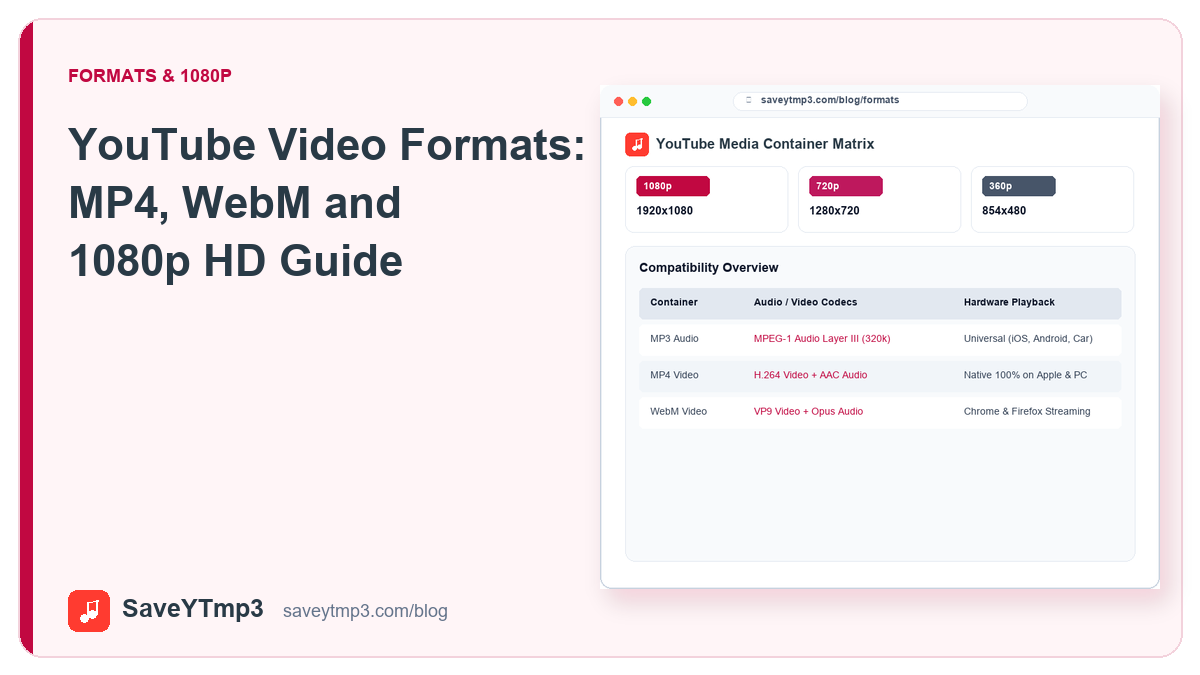
A codec, short for coder-decoder, is the mathematical algorithm that compresses raw video frames into manageable digital data. Common video codecs include H.264, VP9, and AV1. An MP4 container typically holds video encoded with the H.264 codec paired with AAC audio. Conversely, a WebM container usually packages video encoded with VP9 or AV1 alongside Opus audio tracks.
Why MP4 Remains the Universal Video Standard
Despite newer compression technologies offering slightly smaller file sizes, MP4 remains the undisputed king of universal hardware compatibility. When you download an MP4 file, you gain several distinct practical advantages:
- Native Hardware Acceleration: Virtually every modern computer processor, smartphone graphics chip, and smart television contains dedicated silicon designed to decode H.264 video efficiently, consuming minimal battery power.
- Universal Player Support: MP4 files open effortlessly inside QuickTime on macOS, Windows Media Player, iOS Photos, Android Gallery, and media players like VLC.
- Smooth Video Editing: Video editing platforms including Adobe Premiere, DaVinci Resolve, Final Cut Pro, and CapCut import MP4 files natively without requiring preliminary conversion steps.
Audio Compression Synergy in Video Files
High visual resolution requires matching acoustic fidelity to deliver an immersive viewing experience. In high-definition video productions, background ambient tracks and speech synchronization are preserved through multi-channel AAC audio streams encoded at transparent bitrates.
When downloading video presentations or musical concerts through SaveYTmp3, our processing engine preserves audio alignment down to the millisecond. This tight synchronization eliminates noticeable lip-sync lag often observed in poorly multiplexed web downloads. If you wish to archive only the acoustic performance, our companion audio bitrate comparison explains how to save storage with standalone MP3 files.
Understanding WebM and Modern Web Streaming
Developed as an open-source format, WebM was built specifically for efficient web streaming inside HTML5 video elements. Modern web browsers like Chrome and Firefox utilize WebM to stream high-resolution content while minimizing server bandwidth.
However, WebM files often encounter compatibility obstacles outside of web browsers. Older media players, automotive displays, and native Apple applications frequently refuse to open WebM containers without installing specialized codecs. For offline storage and cross-device sharing, converting or saving into MP4 is consistently more reliable.
Resolutions: 1080p versus 720p Breakdown
Resolution defines the dimensions of the pixel grid that constructs each video frame:
- 1080p Resolution (1920x1080 pixels): Known as Full High Definition, 1080p offers crisp detail, readable small typography, and sharp edges. It is ideal for viewing on desktop monitors, laptops, and large television screens.
- 720p Resolution (1280x720 pixels): Known as Standard HD, 720p delivers excellent clarity on smartphone screens and tablets while requiring approximately forty percent less storage space than 1080p files.
SaveYTmp3 allows you to select between 1080p and 720p depending on whether maximum graphic fidelity or compact file size is your priority. Mobile users on limited data often prefer 720p for rapid downloading and minimal storage use.
Bitrate Impact on Visual Motion Clarity
While resolution dictates overall pixel count, video bitrate governs how cleanly those pixels change during rapid movement. A video recorded in fast-action settings, such as drone flyovers, sporting events, or high-speed gaming tutorials, requires sufficient bitrate to prevent macro-blocking artifacts.
If bitrate allocation is too thin, fast panning shots break down into blurry square pixel clusters. SaveYTmp3 extracts video streams encoded with robust variable bitrates, ensuring that camera pans, confetti explosions, and rapid athletic cuts maintain clean visual edge definition without blurring.
How YouTube Delivers High-Resolution Video Streams
YouTube utilizes dynamic adaptive streaming over HTTP to distribute content. For videos at 1080p resolution and above, YouTube separates the video stream from the audio track on its servers to adjust quality on the fly.
When you download a 1080p video through SaveYTmp3, our cloud backend retrieves both the high-definition video track and the synchronized audio stream, packaging them cleanly into a complete, standalone MP4 file. The resulting video plays smoothly with synchronized sound on any device.
Share this post: