When converting online video to audio, choosing the right bitrate determines how your music, podcasts, and audiobooks will sound. Many websites display options ranging from 128 kbps to 320 kbps without explaining what those numbers mean. Selecting the wrong setting can result in unnecessarily large files or compromised acoustic fidelity.
Understanding digital audio compression allows you to strike a good balance between acoustic clarity and storage efficiency. With our specialized SaveYTmp3 audio converter, you have complete control over output bitrates. In this detailed guide, we break down the real acoustic differences between 128 kbps and 320 kbps audio.
What Does Audio Bitrate Actually Measure?
Bitrate refers to the number of kilobits of data processed during each second of audio playback. A higher number indicates that more digital information is used to recreate the original sound wave. When sound is converted into MP3 format, perceptual audio encoders analyze the recording and discard frequencies that human ears struggle to detect.
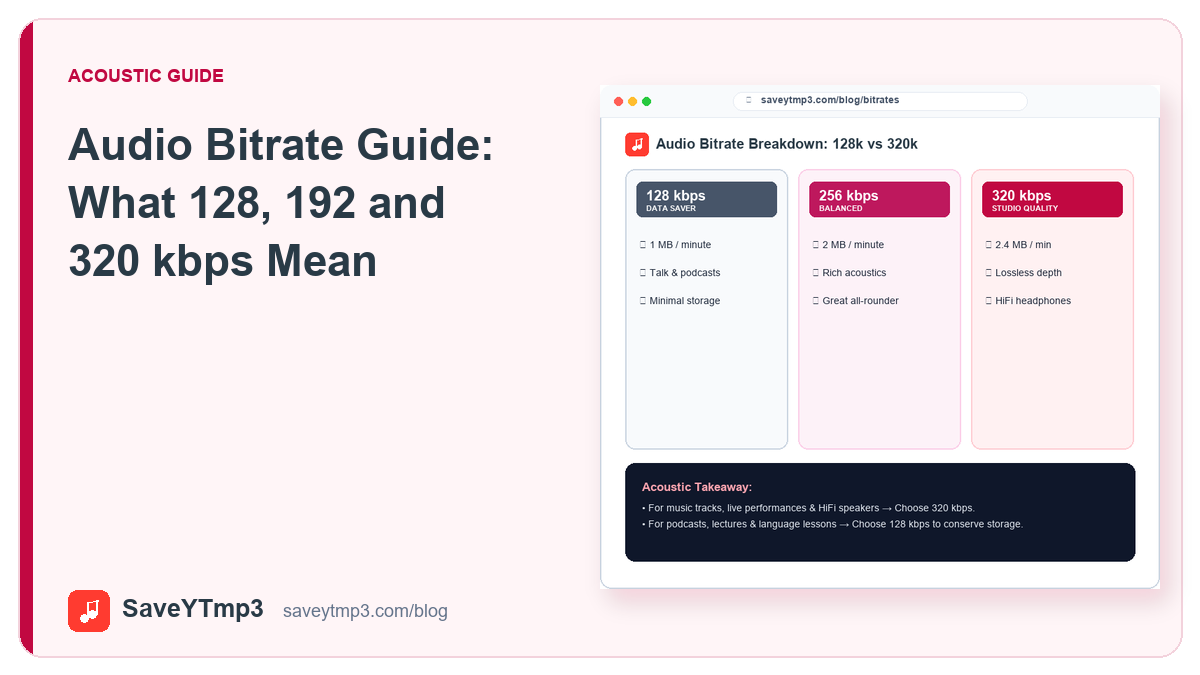
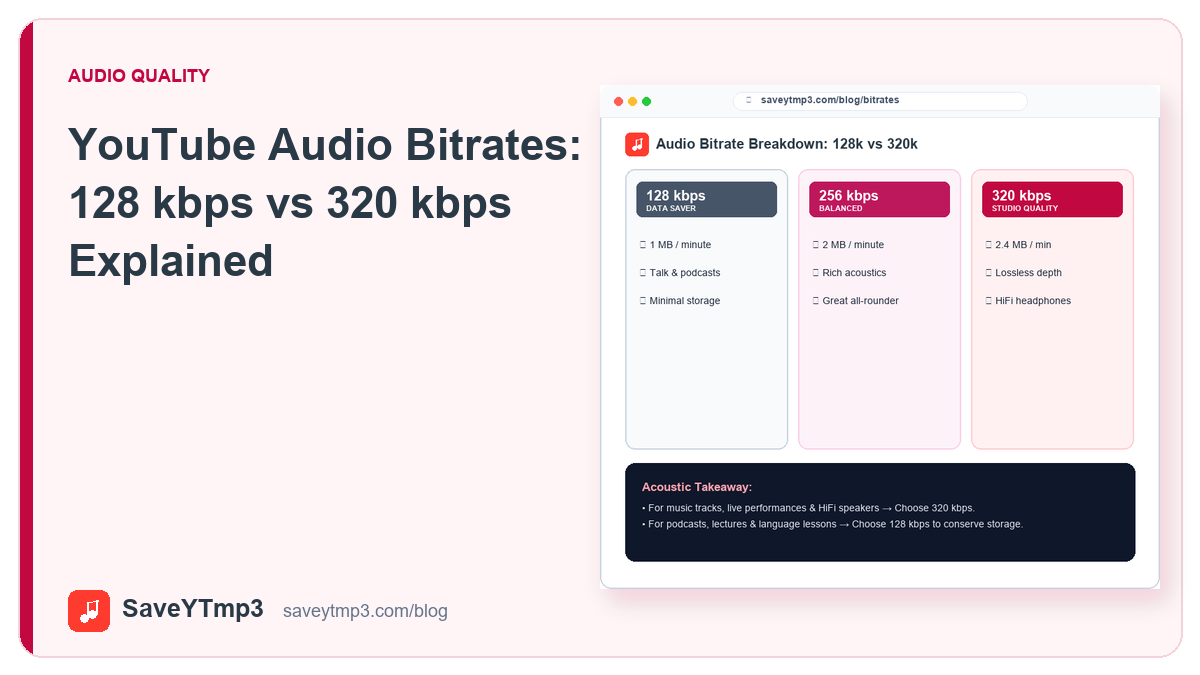
At 128 kbps, an MP3 file allocates sixteen kilobytes of data per second. At 320 kbps, that data allocation expands to forty kilobytes per second. This extra bandwidth allows the compression algorithm to preserve delicate acoustic nuances, subtle reverb trails, and high-frequency cymbal crashes that would otherwise be discarded.
The Acoustic Profile of 128 kbps MP3 Files
For many years, 128 kbps represented the default standard for internet audio distribution. It produces very compact file sizes, roughly one megabyte per minute of stereo sound. However, achieving this compactness requires aggressive filtering:
- High-Frequency Roll-Off: Most 128 kbps encoders sharply cut off frequencies above sixteen kilohertz. This can make hi-hats, cymbals, and vocal sibilance sound slightly dull or metallic.
- Stereo Imaging Compression: Complex panning effects and wide spatial separation are often narrowed to preserve data across channels.
- Ideal Use Cases: Spoken word content, university lectures, news podcasts, and voice memos sound clear and intelligible at 128 kbps while conserving device storage.
The Acoustic Profile of 320 kbps MP3 Files
At 320 kbps, MP3 compression operates at its maximum supported constant bitrate. The perceptual encoder preserves acoustic frequencies up to twenty kilohertz, covering virtually the entire range of human hearing:
- Full Frequency Retention: Bass notes sound tight and punchy without distortion, while upper treble harmonics remain silky and open.
- Expansive Soundstage: Orchestral arrangements, complex electronic music, and live concert recordings maintain their original depth and spatial separation.
- Storage Requirement: A three-minute song encoded at 320 kbps occupies approximately seven megabytes of storage space. For listeners using quality headphones, this modest storage footprint is well worth the fidelity upgrade.
Spectrogram Analysis and Psychoacoustic Thresholds
When examined through a digital spectrogram analyzer, the visual contrast between bitrates becomes immediately apparent. In a 128 kbps file, the frequency plot exhibits a flat artificial ceiling above sixteen kilohertz, where upper harmonics are ruthlessly sliced away to meet bitrate limits.
In contrast, a 320 kbps file displays rich acoustic density reaching all the way to twenty kilohertz. Instruments with dense upper harmonics, such as acoustic violins, snare drums, and grand pianos, display natural decay patterns. This acoustic fullness reduces auditory fatigue during extended listening sessions on high-grade monitoring equipment.
Hardware Transparency and Listening Environments
Whether you will notice the acoustic divergence between 128 kbps and 320 kbps depends heavily on your listening environment. When playing audio through built-in laptop speakers or basic phone earpieces, the physical limitations of tiny transducer cones mask high-frequency roll-off.
However, once you plug in over-ear studio monitoring headphones or connect your device to an automotive stereo system, the difference becomes immediately audible. At 128 kbps, kick drums lose low-end punch and acoustic guitars sound strangely compressed. Encoding at 320 kbps preserves instrument separation, allowing each element in a complex musical mix to breathe naturally.
Preserving Dynamics Across Different Musical Genres
Musical genres with wide dynamic contrasts highlight the necessity of generous bitrates. Classical symphonies transition from whisper-quiet solo flutes to booming orchestral crescendos. In a constrained 128 kbps file, quiet sections can exhibit audible background artifact swishing, often described by audio engineers as underwater bubbling.
Electronic dance music and modern rock productions also rely heavily on fast transients and sub-bass frequencies below sixty hertz. At 320 kbps, the encoder allocates ample bits to low frequencies without sacrificing stereo width, keeping synthesizers punchy and vocal performances crisp throughout the track.
YouTube Source Audio Realities
An essential technical truth that many conversion services obscure is that YouTube itself compresses uploaded audio. YouTube typically delivers audio streams encoded in Opus or AAC formats at roughly 128 to 160 kbps. When an online tool produces a 320 kbps MP3, it does not invent missing acoustic detail out of thin air.
However, converting directly into 320 kbps constant bitrate MP3 prevents secondary compression artifacts. Re-compressing an existing stream into an aggressive low-bitrate format causes generational degradation. Choosing 320 kbps on SaveYTmp3 ensures that the source stream is converted with minimal additional loss. To understand visual compression factors as well, read our guide on YouTube video formats.
Which Bitrate Should You Choose?
Your listening hardware and storage capacity should guide your selection:
- Select 320 kbps: When downloading music albums, live DJ sets, instrumentals, or tracks you plan to play through studio monitors, car subwoofers, or wired audiophile headphones.
- Select 256 kbps: A balanced intermediate choice providing excellent acoustic fidelity while saving twenty percent of file size.
- Select 128 kbps: Good for daily voice podcasts, talk shows, audio lectures, or when saving hundreds of files onto devices with limited storage capacity.
By matching your bitrate choice to your content type, you get the sound quality you need without wasting precious device memory.
Share this post: